the problem
- the backlog difficult to prioritize
- because it’s a list
- difficult to identify dependencies
- it quickly becomes a network
- already at this point the tasks need detailed understanding
- the backlog is one dimensional
- which is priority
dependencies, again
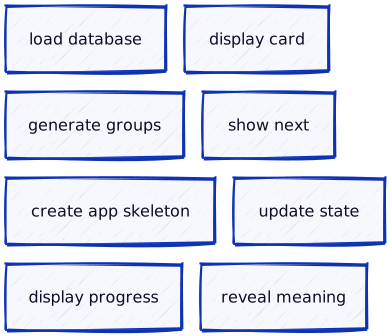

after dependencies are identified ordering isn’t so difficult
dependencies, again
user story mapping
- popularized by Jeff Patton
- original blog post
- The new user story backlog is a map (Patton, 2008)
- User Story Mapping, O’Reilly, 2014, ISBN-13: 978-1491904909 (Patton & Economy, 2014)
- original blog post
- performed in workshops including
- users,
- (UI) designers,
- developers,
- testers,
- and other stakeholders
- build a shared understanding of the product and a common language
other benefits of USM
- helps to understand and prioritise what the user needs
- it can discussed with the customer / users → feedback
- highlights assumptions and risks that might be missed by a single viewpoint
- uncovering dependencies earlier and faster with multiple viewpoints
user story map
- two dimensional
- uses the user’s perspective to tell a story / narrative
- the user want to achieve a goal
- which consists of one or many activities

users’ perspective
the USM uses the user’s perspective to tell a story / narrative
so the developers have to imagine how the user would use the eventually implemented software
the most important thing in [UI/UX] design is empathy – Scott Jenson
readme-driven development
readme ~ user manual, but brief, concise
- before you write any code or tests or behaviors or stories or anything
- document how a user would use the implemented software
- you will know what you need to implement
- a lot simpler to have a discussion based on something written down
source: Readme Driven
Development
by Tom Preston-Werner (Preston-Werner,
2010)
user story map

- two dimensional
- consists of three elements
- activities
- steps
- details
activity
- is sort of a big thing that people do
- that can have multiple steps,
- and doesn’t always have a precise workflow
activities are still user stories with roles
As a social media platform user
I want to follow users
so I can keep up with their posts.
An activity is close to an epic in the scrum literature.
user task
- in agile a “task” refers to the things that developers do
- to finish user stories
- user story mapping considers the user,
- so a user task is what a user needs to do to complete an activity
for example (follow a user)
- search for a user
- add user to the followed list
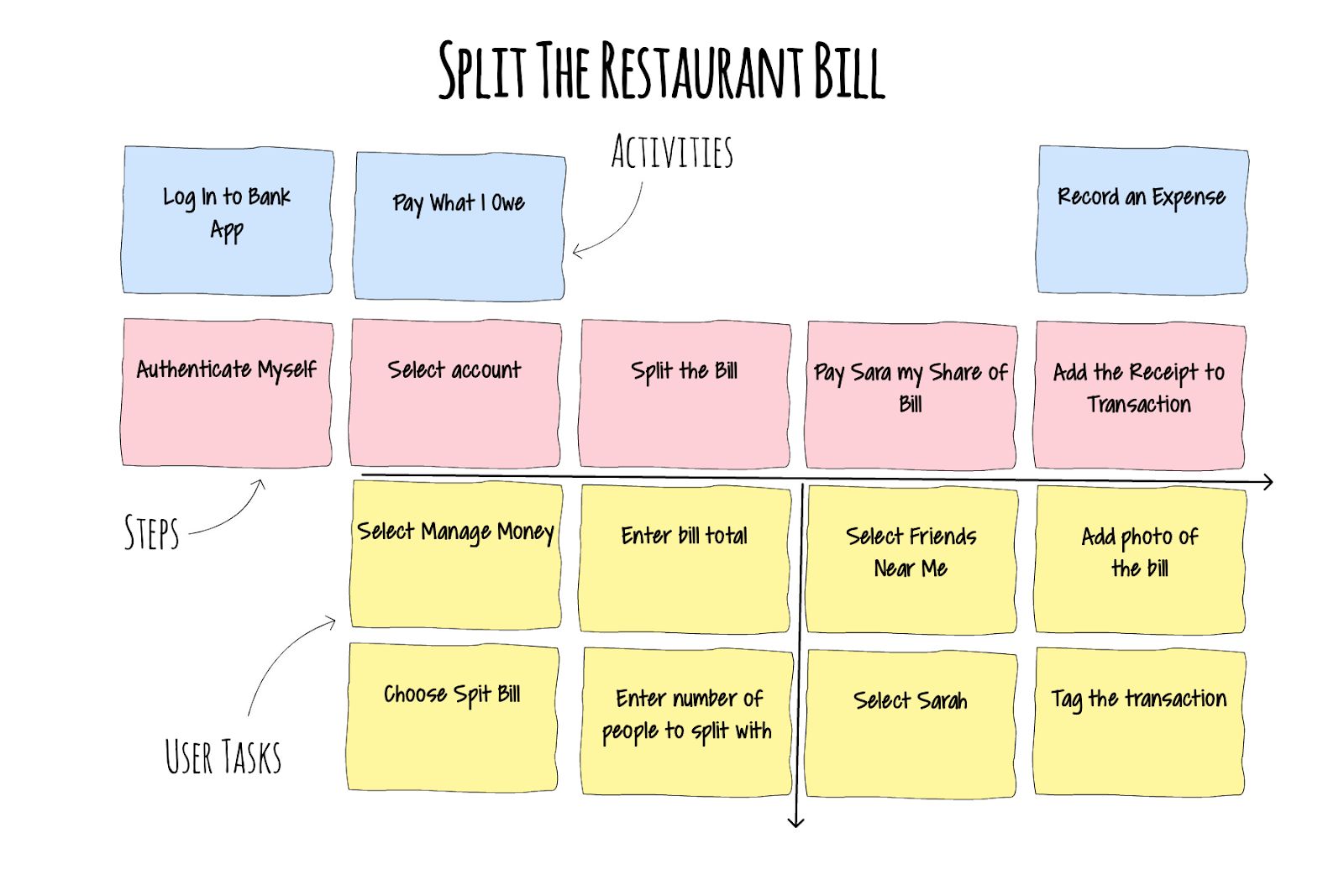
user story map as a document
- not final, not set in stone
- it is possible and encouraged to adjust
as the more knowledge is acquired about the software- versioning
- you are free to move notes up and down
- change the role (activity ↔ user task)
backbone, skeleton, ribs

top-down structure, high-level overview first, then adding details
iterations

user roles / goals
- there can be several different types of user
- a.k.a., role / persona
- each one could have a different reason (goal) for their activities
- as a
[type of user], - I want to
[action/function] - in order to
[reach goal]

story mapping steps
- set the context, decide on the goal
- who is the user we are mapping for?
- what are they trying to achieve with their activity and why?
- what is the outcome they seek and how will we help them to achieve it?
- tell a story
- go wide not deep, details come later
- focus on the narrative flow
- create the backbone of steps
- define user tasks for each step
based on the Quickstart Guide to User Story Mapping
story mapping steps
- set the context, decide on the goal
- tell a story
- create the backbone of steps
- activities as a collection of things you do to get the goal done
- things that get your activity done are steps
- start your steps with a verb, an action
- the order of steps may differ by users, think of an ideal sequence
- discuss different use cases as they come up
- define user tasks for each step
- they can include sub-tasks, alternative tasks, exceptions, details and even UX notes
- if a step has many tasks, is may worth to split into separate steps
based on the Quickstart Guide to User Story Mapping
social media platform example – sign-up

sign-up feature from a minimal social media platform
social media platform example – user management

user management features from a social media platform v2
social media platform example – create content

create content feature from a social media platform v2
social media platform - example

user story mapping mistakes


more from Jeff Patton: 5 story mapping mistakes
flashcard app example

- let’s say the idea of the progressbar came later
- but feels strongly connected to the previous card

- the you freely merge the two
- it’s fine to add every idea then do some cleaning
flashcard app example
- software doesn’t matter, cards are just rectangles
- collaborative work does

- the color doesn’t matter to much
- the blue-pink-yellow will be used for consistency

speadsheet as a user story map
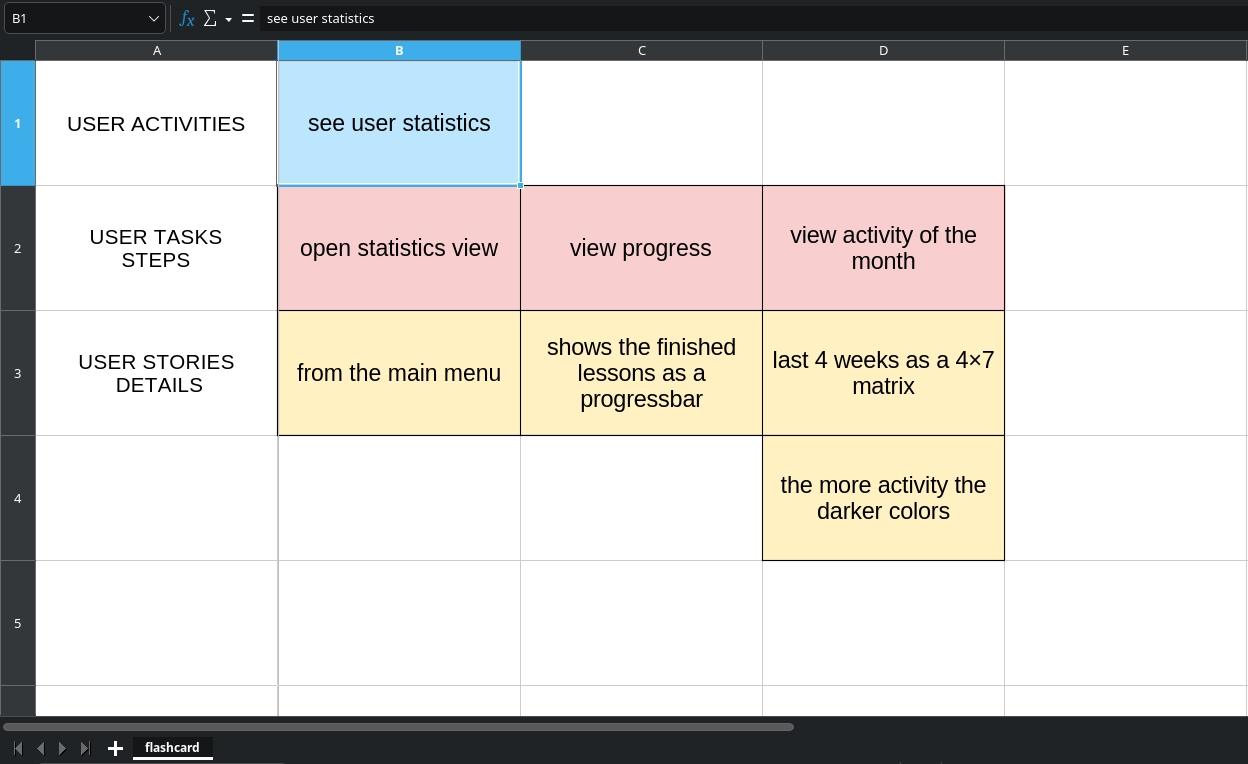
- Google Sheets can be used, shared between team members
- Avion’s User Story Mapping Template
how is user story mapping agile?
- performed in workshops with diverse teams
- the most effective method of conveying information is face-to-face conversation
- cross functional teams
- welcomes changing requirements
- the user story map is a living document
- content is not set in stone
- USM can discussed with the customer / users
- easy to understand and gain feedback
user story mapping – summary
user story mapping
- performed in workshop
- build a shared understanding
user story map
- three levels
- activities (backbone)
- big thing that users do
- has multiple steps
- not always has a workflow
- has roles
- steps (skeleton)
- details
- activities (backbone)
- zooms from an overview to details
- not a flowchart
- multiple interations
- living document
- versions
references
Patton, J. (2008). The new user story backlog is a map. https://jpattonassociates.com/the-new-backlog/ .
Patton, J., & Economy, P. (2014). User story mapping: Discover the whole story, build the right product. " O’Reilly Media, Inc."
Preston-Werner, T. (2010). Readme driven development. https://tom.preston-werner.com/2010/08/23/readme-driven-development.html .